Showing posts with label customer support. Show all posts

Saturday, January 12, 2008

T-Mobile Declares Customer Support Bankruptcy

A while back I heard the phrase "email bankruptcy," which describes the state some people reach when their inbox contains thousands of messages that they simply cannot cope with. The mere sight of it is paralyzing, and so sometimes people simply "declare bankruptcy" and delete them all - then send a message to everyone in their address book announcing that all email is gone, and anything important was there, please re-send it. And then the hapless victim of email overload vows to do better.

Apparently T-Mobile is having this problem. A week or so ago I sent an email to their Hot Spot customer support group with an account question. It wasn't a critical issue; I signed up for the service with a term commitment, and I wanted to know when it ended. That's information that I should be able to see when I log into my account on their site, but they don't provide it, so I asked.

I finally got a response:

Dear Valued Customer,

Thank you for taking the time to contact T-Mobile HotSpot regarding.

I greatly apologize for the delay in response. We are currently experiencing a high volume of e-mails. Your comments, concerns and questions are very important to us and we would like to see your issue satisfactorily resolved. For prompt assistance, please contact our Customer Service Department anytime 24 hours a day, 7 days a week at 877-822-7768. Again, I greatly apologize for the delay and for any inconvenience you have experienced.


Hello, T-Mobile? If you'd like to see my issue satisfactorily resolved, answering my question would be a great idea. And if you have people standing by to talk to me on the phone, couldn't some of them answer the email waiting for responses?

Here's the kicker:

Please feel free to contact us by email or at the number below if you have any further questions, comments or concerns.


So, they've sent me an email to tell me they aren't answering email anymore, and they're inviting me to respond to them by email.

It's not often that a multinational telecommunications provider is able to make themselves seem so completely amateurish. I get the feeling that T-Mobile is really Gunther and Inge in somebody's garage trying to keep the wheels flying off the whole enterprise.

Really sad.

Saturday, December 22, 2007

A Simple Technology Rule: Use it to Talk to Customers

This seems obvious, right? We've got all of this old technology (like phones), not so new technology (email, your web site), and cutting-edge stuff (social networks) available, and so we should use it to improve communications with our customers. Improvement means not just talking in more ways, but more useful ways. We can make it easier for customers to find the right people in the organization to help them. We can put useful information at their fingertips. We can help would-be customer evangelists spread the word.

Or, we could not bother. I experienced an example of this with Washington Mutual, the bank whose ads position them as the happy bank with a human face where you don't have to go through layers of bureaucracy to get help.

The other day I got an email from them about a business account, informing me that my phone number had been changed. The problem was, I hadn't changed any phone number with them, and the number now on my account was not mine. (It was a number of mine with one digit changed - weird.)

My first thought, of course, was that the security of my account might have been compromised. The email ended with a note that if I had not made this change, I should call an 800 number right away.

Which is precisely what I did. Did that 800 number take me to a security department that could figure out what was going on? Or at least to a person, because obviously this problem required human intervention?

Oh, no. "Welcome to Washington Mutual! Para informacion en espanol...."

I was at the top level of the main service menu. And a funny thing about WaMu's main menu: there is no option that sounds right for "I think my account security has been compromised." And there is no option to speak to a person. (Hitting "0" gives you a "bad customer, that wasn't a choice!" option.)

Is that really the experience you want a customer to have when they are sitting there wondering if someone's gotten into their account and is taking their money?

I eventually chose the option to find out about recent transactions, and then intentionally entered an incorrect access code, which bounced me from voicemail to a person, who had no idea how my phone number got changed (but did reset my password).

The very next day, I had an almost identical experience with them when I tried to activate a new ATM card on the web. I got an error message indicating that the information I entered didn't match what they had. So I went through the same "no menu option makes sense for what's happening" hassle, eventually got a person who activated my card (and verified that all the information I entered did indeed match what they had).

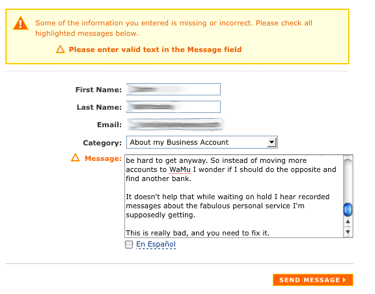
I am the customer who lets a company know when something is wrong, so I clicked the "contact us" link on their web site, and wrote a short message in the form provided to tell them that it's not okay with me that when there is a potentially serious problem, I'm shunted to a voicemail system offering me no useful options or a way to get a person easily. (How hard is it to set up a special 800 number?) And that these two experiences left me feeling very unsure whether any of their IT systems works properly and my money is safe with them.

I was pleased to find that form; far too many companies still have web sites designed to prevent customer feedback: no forms, no email addresses, or forms that are designed to let customers only submit structured information that the company wants to hear, rather than other feedback from customers who care enough to tell them what's going on. Okay, I thought, score one for WaMu.

And then I clicked send.

wamuhell.png

The form doesn't work. I tried in two different browsers in case I was having some browser-specific issue. You can't talk back to them.

This is such basic stuff. There are still a whole lot of companies out there who, before they try to tackle new media, or spend money on ads about how friendly and approachable they are, need to do the basics: create a web site that makes interaction with customers easier, not more frustrating for them.

Thursday, November 01, 2007

Why Doesn't Everyone Do This?

Mobile phones are highly personal objects, and as a result, getting a new one - no matter how great it is - can be traumatic in some ways. You have a lot to relearn. How do I add that person to my contacts? How do I swap calls when I get another call coming in? How does the conference calling work? Whoops, that button hangs up the phone (sorry, whoever I was talking to). What's that button on the side?

And when using an operating system designed to cram information into a tiny screen, and that relies on a couple of multipurpose buttons for input, it's obviously challenging for the developers too. So there are two problems: deciding whether you'll really like a phone, or wind up hating it after using it a couple of months, and learning all that stuff when you get a new phone.

I'm in the "now that I know it I hate it" phase with my phone and am thinking of getting an iPhone. And so I actually sat and watched the twenty-minute "guided tour" video that Apple's got on their web site.

You know what? Not only is it a good sales piece, it's something that I wish I could have watched for every phone I've ever used.

As I watched, I thought about thumbing through a Motorola phone manual once upon a time to figure out how things worked (usually finding that "this service is carrier dependent, so go figure it out yourself" for many of my questions), and thought, Why didn't they do this? (Especially since Motorola generally makes lovely hardware with demented software.)

Yes, it's a sales piece - but it manages to tell you how to do everything. Make a call, take a call, switch calls, conference people together, add people to your contacts, use other applications while talking to somebody, get your email, send a text message, and so on.

It's very handy for a potential buyer because it gives you a real sense of what using the phone will be like - not 100%, of course, but more than you'll get playing with it in the store for ten minutes. And if you've just taken one out of the box, it's the twenty minute "here are all the basics you need" primer that is notably absent from other phones.

I've railed in the past about dumb use of video to present information better communicated in text. This is the opposite; this is an excellent use of video to show you things that would sound complicated in print. If I get an iPhone the first thing I'll do is sit down, phone in hand, and watch it again and follow it along, and I think it will help me avoid the "first week of new phone" issues of hanging up on people, missing calls, and so on.

The thing is... it's so obvious. Why isn't there one of these for every phone that has more than basic calling functions (which is to say, pretty much every phone)?

Tuesday, October 30, 2007

The Beta Joke

It seems that every new web service that appears is in "public beta," and that granddaddy of these is Gmail, which has been in "beta" for three years. Last week Google announced that it was adding IMAP support to Gmail - a much needed improvement for anybody who accesses email from multiple devices - with the usual Google comment that it would activated in everybody's Gmail accounts "in the next few days."

It's turning out to be much slower than that, and at least once I've heard someone say, "Well, it is a beta product."

It's a beta product that is presented to the world as a finished product in every way but the word "beta" on the screen, and Google deserves some grief for this. Once upon a time, it actually meant something when a product was in beta. It meant that it was not intended for real-word use just yet, it was changing and being fixed, and you used it at your own risk. And it also mean there was a schedule somewhere for it to get out of beta, for a release candidate to be ready, and for it to become a real product.

I don't think you're going to find anyone at Google who will seriously tell you that they view Gmail as an unreleased product. Especially when it's a key component of their Google Apps service, which is not marked beta.

So, having gotten lots of individuals and now businesses (including mine) to use Gmail as their mail service, what does that beta mean? It's a joke, and it makes Google look very bad. Add to that the broken promise of an important new features being there in "a couple of days" and you it seems like at Google beta means, "not really supported, good luck to you!"

Gmail is a very, very good product, even in its "beta" form. I just with Google would be honest with its users, and drop the "beta" tag. It's a free mail service, the expectations for support are not that high anyway.

And, I think they've played a big part of creating this "everything is beta" craze, which is good for nobody except service providers who don't want to support users.